NGA Website
Overview
The NGA Website is the online home of the Gallery. It seeks to serve the Gallery's goals by:
Hon rules
Providing Gallery Information – Essential details like the gallery's history, mission, location, hours, contact information, and staff bios.
Promoting Exhibitions and Events – It provides information about upcoming exhibitions, openings and special events, allowing visitors to stay informed about gallery programming.
Ticketing - Visitors are able to purchase exhibition and event tickets through the site.
Content and Resources – The site hosts a wide range of content, such as artist talks, podcasts, articles, and video interviews, aimed at enriching the visitor's understanding of art and artists.
Public Engagement and Community – The site offers avenues for public engagement, such as newsletter sign-ups and social media integration.
Visitor Interaction – Features like contact forms, event RSVP options, and virtual tour links allow visitors to engage with the gallery directly from the website.
Fundraising and Support – The site promotes and provides the mechanism for our audience to become members, donors as well as informing them of fundraising initiatives, encouraging support from patrons and art lovers.
Licensing requests – Visitors are able to request image usage of works of art in our collection.
Architecture
The NGA Website is built on Wagtail, an open-source content management system (CMS) that’s built on Django, a popular Python web framework. It is built and maintained by the Interaction Consortium.
The codebase is stored on GitHub: https://github.com/ixc/national-gallery-of-australia/
Hosting
We maintain two sites:
Production
Production is our live site.
- Live: https://nga.gov.au
- Admin: https://nga.gov.au/nga-admin
Both sites are hosted by Serversaurus.
Staging
The staging site is a copy of the live website used for testing and development before applying changes to the live environment.
- Live: https://staging.nga.gov.au
- Admin: https://staging.nga.gov.au/nga-admin
To view the staging site you will need the following credentials:
Username: nga
Password: preview
Caching
Normally, every time someone visits a page a request is sent to the site server. The server then needs to process this request and send the page contents back to the visitor.
Site caching prevents this. When a page is first loaded by a visitor it is saved in a temporary storage location (cache). Now, every visitor after that loads the cache rather than sending a request to the server.
This has two benefits:
- It improves site performance because the server doesn't have to process every request
- Visitors can still view the site even when there is an issue with the server
Caching is only available to visitors outside of the Gallery's network. We have done this so that anyone who is on the Gallery network can identify server issues straight away.
PeakHour provides the Gallery with our caching service.
Clearing the cache
The PeakHour cached is cleared every 30 minutes. This ensures that cached pages stay relatively up-to-date.
When a page is published, the cache for that page is flushed. This ensures that a visitor gets the most up-to-date version of that page.
There often times we will want to manually clear the cache. To do so you will need to:
- Log into the PeakHour admin
- Navigate to Domains > Active Domains > nga.gov.au > Manage
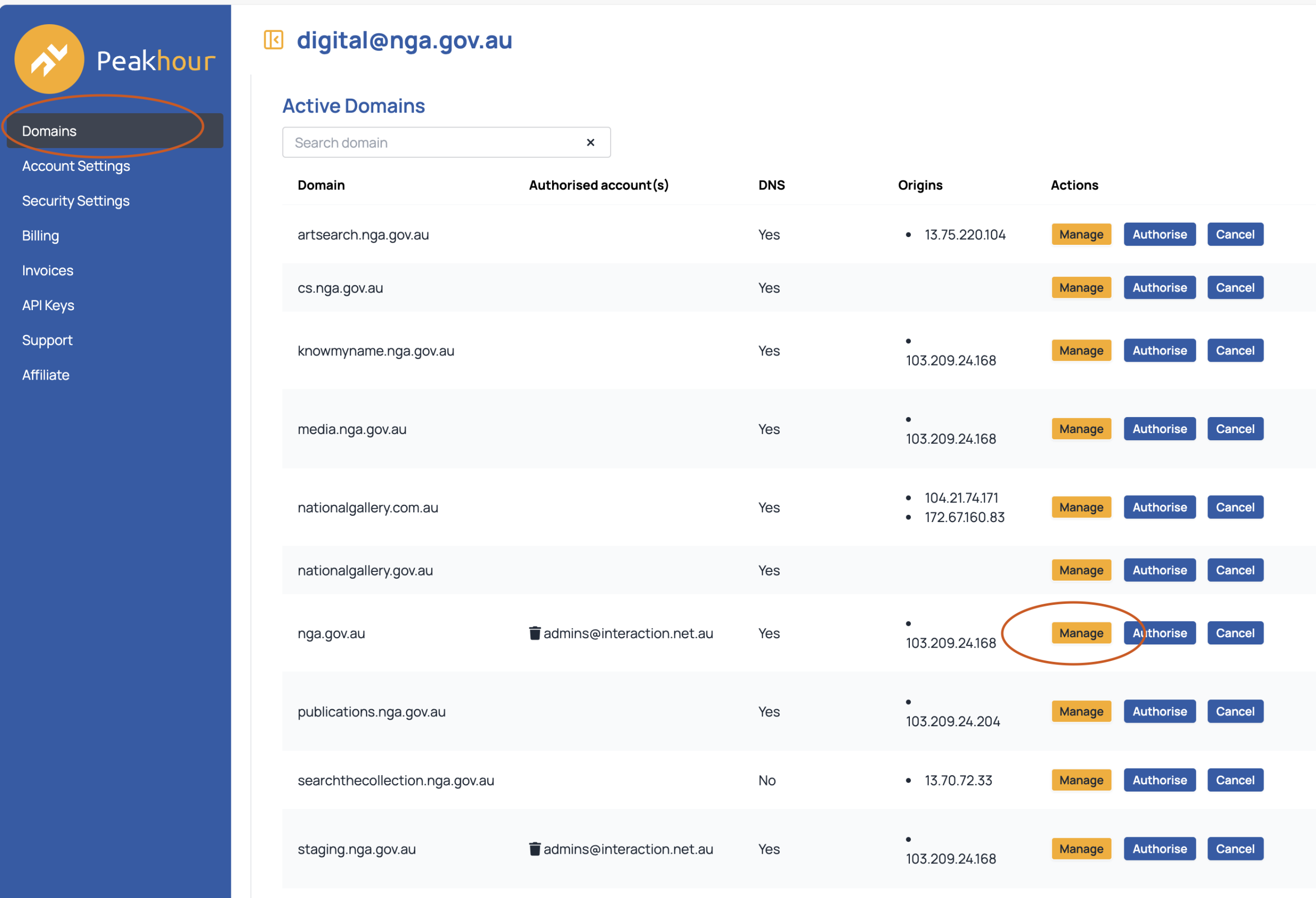
- Navigate to CDN > Purge > Full site purge > Flush
Bot blocking
Peakhour restricts bots from accessing our site.
Sometimes this means friendly traffic can't view the site. To whitelist this traffic you will need to get their IP address and add it to the safe list.
To do this:
- Log into the PeakHour admin
- Navigate to Domains > Active Domains > nga.gov.au > Manage
- Go to Firewall > Access Rules
Add the IP address
Tessitura
Information about our site and Tessitura can be found here.
Online publications / Online student publications
Online publications are microsites that are self-contained digital publications. So far these are:
- Raushenberg & Johns: significant others
- Ceremony
- Stories: Australian People and Places
These were built by Distil Immersive.
Full documentation can be found at NGA Digital Publications – Technical documentation.
Image licensing request portal
Members of the public can request to license a work of art, image or website content.
Making a request
The website provides two paths to make a request:
- Through a work of art page on Search the Collection
- Through the License Request form: https://nga.gov.au/licence-request/1/items-selection/
Viewing requests
All requests are saved at Copyright Licence > Licence Requests (note that pre-2026 requests are found at https://nga.gov.au/nga-admin/licence/licencerequest/).
License Request form copy can be edited at Coypright Licence > Copyright Settings
To export License Request details to an external spreadsheet, a copy function exists at Copyright Licence > Spreadsheet
Permissions
Admin access to license requests are limited to the Copyright Admin group. Admin users must be added to this group to view, edit and delete license requests.
Onsite digital wayfinding screens
The Gallery has multiple on-premises screens that show exhibition location. E.g:
These pages are authored in the Wagtail CMS.
All publicly facing screens can be found at: https://nga.gov.au/onsite-screens/. This is also where the screens are authored.
The screens automatically pull exhibition titles, dates and gallery location from Exhibition Pages. When an exhibitino ends, it is automatically removed from the screen.
To ensure all content fits on the screens (1080 x 1920) there is a scaling device in the admin that can shrink or expand the type size:
Security
During an elevated security alert we have additional measures we can implement.
Implement basic authentication on login page
Basic authentication is a simple way to prevent access to a web page using a username and password. When a visitor tries to access a page, the are presented with the following window:
By implementing this on the site's admin login page (nga.gov.au/nga-admin), we add an extra layer of security to accessing the site's admin.
How to implement
Contact the Interaction Consortium on support@interaction.net.au
Request for "basic auth to be implemented on nga.gov.au/nga-admin". Provide them with a username and password you would like to use.
Once this is done, they will make a deployment to Production to make it live
Inform key admins that this has been done and share the username and password
Disable accounts
Disabling CMS accounts will ensure only key site admins can access the CMS.
How to implement
Contact the Interaction Consortium on support@interaction.net.au
Request for them to "disable all CMS admin accounts through a command line database query". Ensure you let them know which key accounts you would like to remain active.
Change origin to static page
If the site is compromised, vandalised or taken down, we have a static page that we can point our domains to. This page can be found at https://papaya-lolly-8d148f.netlify.app/.
How to implement
Log into the Peakhour dashboard
Navigate to Domains > relevant domain (e.g nga.gov.au) > Manage
Navigate to Edge > Rules and tick “Maintenance”
Troubleshooting
What should I do if the site is down
First notify:
- Digital Platforms Manager
- Online Content Producer
They will then follow this procedure.
Notify:
- The IC support@interaction.net.au.
- PeakHour dan@peakhour.io / support@peakhour.io
When you contact them please include as many details as you can:
- What time you started noticing the issue
- The URL where you’re seeing the error(s)
- What errors you’re seeing:
- Is the site not responding at all
- Are you getting a 500 error
- Are you getting a 404
- Who is seeing the issue (please check each of these):
- Logged out users on the public (outside NGA) network (you can check this with your phone with wifi turned off)
- Logged out users on the NGA network
- Logged in admin users
From experience, a site outage is usually either an issue at PeakHour or, more rarely, an issue at Serversaurus.
If people outside the NGA network can access the site (you can test this by trying the site on your phone), but people inside the NGA network can’t – the issue is likely with the IC or Serversaurus. You should email both about what’s going on.
On the other hand, if people inside NGA can access the site just fine, but people outside NGA can’t – you almost certainly have an issue with PeakHour. The first thing to do is to try flushing the cache, but if that doesn’t resolve things then contact PeakHour and CC IC support.
Key contacts
- Developers – Interaction Consortium support@interaction.net.au
- Servers – Serversaurus martin@serversaurus.com.au / support@serversaurus.com.au
- Caching – Peakhour dan@peakhour.io / support@peakhour.io